
Coffalyser.Net consists of three components that have independent version numbers: the client, server and database. It is important to ensure that the versions of these three components in your installation are compatible with each other, and that this is the case on all computers that have Coffalyser.Net installed. The use of incompatible versions can lead to unexpected errors and results.
As of Coffalyser.Net v.261123.0543, released in November 2026, it is no longer possible to use an incompatible combination of the three components. If you use an older version of Coffalyser.Net, it is useful to confirm that your configuration is valid.
Please contact us for guidance in case you find that you have an invalid combination of versions. Depending on the specific mismatch, different correction steps may be required.
Step 1: Find your versions
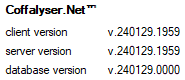
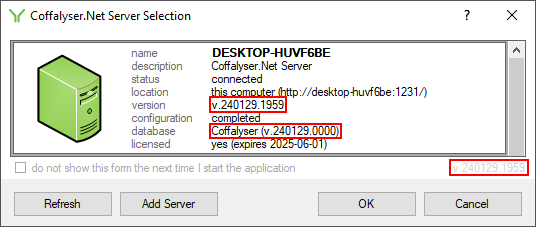
You can conveniently find the versions of all three components in the About dialog when logged in, or in the server selection dialog even when not logged in. The screenshots below provide an example. In the server selection dialog, the client version is the version displayed in grey in the bottom-right corner, the server version is listed behind the version label, and the database version is listed behind the database label. More instructions can be found in this article if required.
Step 2: Check compatibility
The table below lists all compatible versions of the Coffalyser.Net components that may be in active use. For a full overview of all recent versions, see the full version history.
| Client Version |
Server Version (s) |
Database Version |
|---|---|---|
| v.261123.0543 | v.261123.0543 1 | v.261020.0000 |
| v.261027.0718 | v.261027.0718 | v.261020.0000 |
| v.260901.1020 | v.260901.1020 | v.260821.0000 |
| v.250317.1029 | v.250317.1029 | v.240129.0000 |
| v.240129.1959 | v.240129.1959 | v.240129.0000 |
- Client version v.261123.0543 is also compatible with server version v.261027.0718 – if you have this configuration, there is no need to take action. However, the generally recommended approach is to always update both the client and server versions together.
If you are using a different combination of client, server and database, please contact us with a screenshot of your server selection dialog for assistance.
If you have a setup with a central server to which users from multiple workstations connect, the client version must be compatible with the versions of the central server and database on all workstations.
Background
The client is the end-user application that you interact with, the database contains your data and settings, and the server takes care of the communication between the client and the database. The version numbers of the client and server are usually the same. This is also the version number that is used most often in communication and documentation. The database may have a different version number, which can sometimes remain unchanged for multiple versions of the client and server.